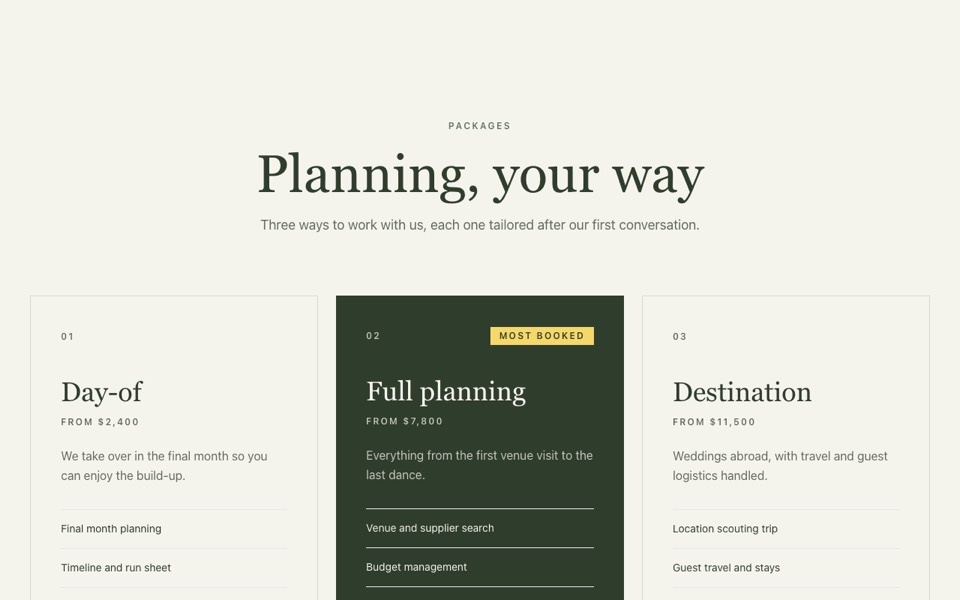
Three package cards where the highlighted plan turns deep green with a yellow price and label. React and Tailwind CSS, no dependencies.
PackagePricing.tsx
// Package pricing: three cards where the highlighted one turns deep night-green
// with a sun-yellow price and label. Pure Tailwind, no dependencies. Works with Tailwind v3 and v4.

type Plan = { name: string; description: string; price: string; period?: string; features: string[]; cta: string; href?: string; highlighted?: boolean; label?: string };

type Props = {
  eyebrow?: string;
  heading?: string;
  intro?: string;
  plans?: Plan[];
  note?: string;
};

const DEFAULT_PLANS: Plan[] = [
  { name: "Starter", description: "For smaller homes with modest daytime use.", price: "$6,900", period: "installed", features: ["4 kW system, 10 panels", "Smart inverter", "25-year panel warranty", "App monitoring"], cta: "Get a quote" },
  { name: "Home Plus", description: "Our most popular system, sized for a family home.", price: "$11,400", period: "installed", features: ["7 kW system, 18 panels", "10 kWh home battery", "EV charger ready", "25-year warranty", "Free yearly check"], cta: "Get a quote", highlighted: true, label: "Most popular" },
  { name: "Off-grid", description: "Full independence for rural and remote properties.", price: "$19,800", period: "installed", features: ["10 kW system, 26 panels", "20 kWh battery bank", "Backup generator link", "Priority support"], cta: "Talk to us" },
];

const Check = ({ light }: { light: boolean }) => (
  <svg viewBox="0 0 24 24" fill="none" stroke="currentColor" strokeWidth={2.5} strokeLinecap="round" strokeLinejoin="round" aria-hidden className={`mt-0.5 h-4 w-4 shrink-0 ${light ? "text-[#ffe500]" : "text-[#1e9e50]"}`}>
    <path d="M20 6 9 17l-5-5" />
  </svg>
);

export default function PackagePricing({
  eyebrow = "Packages",
  heading = "Solar that pays for itself",
  intro = "Fixed prices, installed by our own team, with finance from 0% APR.",
  plans = DEFAULT_PLANS,
  note = "Prices include installation, scaffolding and grid connection.",
}: Props) {
  return (
    <section className="bg-white px-5 py-24 font-['Manrope',ui-sans-serif,system-ui,sans-serif] text-[#252926] antialiased md:px-10 md:py-32">
      <div className="mx-auto max-w-7xl">
        <div className="mx-auto mb-12 max-w-2xl text-center">
          <p className="mb-5 inline-block rounded-full bg-[#e5f4e5] px-4 py-1.5 text-sm font-semibold text-[#0f4729]">{eyebrow}</p>
          <h2 className="font-['Bricolage_Grotesque',ui-sans-serif,system-ui,sans-serif] text-[clamp(2.25rem,4.5vw,3.75rem)] font-semibold leading-[1.05] text-black">{heading}</h2>
          <p className="mt-5 text-lg text-[#494949]">{intro}</p>
        </div>

        <div className="grid items-stretch gap-4 lg:grid-cols-3">
          {plans.map((plan) => {
            const dark = !!plan.highlighted;
            return (
              <article key={plan.name} className={`relative flex flex-col rounded-3xl p-8 md:p-10 ${dark ? "bg-[#052625] text-white/75 shadow-2xl lg:-my-4 lg:py-14" : "border border-[#e3e8e3] bg-white"}`}>
                {dark && plan.label && <span className="absolute right-8 top-8 rounded-full bg-[#ffe500] px-3 py-1.5 text-xs font-bold uppercase text-[#0f4729]">{plan.label}</span>}
                <h3 className={`text-2xl font-semibold ${dark ? "text-white" : ""}`}>{plan.name}</h3>
                <p className={`mt-3 ${dark ? "" : "text-[#494949]"}`}>{plan.description}</p>
                <p className="mt-8 flex flex-wrap items-baseline gap-x-2">
                  <span className={`font-['Bricolage_Grotesque',ui-sans-serif,system-ui,sans-serif] text-5xl font-semibold leading-none ${dark ? "text-[#ffe500]" : "text-black"}`}>{plan.price}</span>
                  {plan.period && <span className="text-sm">{plan.period}</span>}
                </p>
                <ul className={`mt-8 space-y-3 border-t pt-8 ${dark ? "border-white/15" : "border-[#e3e8e3]"}`}>
                  {plan.features.map((f) => (
                    <li key={f} className="flex items-start gap-3">
                      <Check light={dark} />
                      {f}
                    </li>
                  ))}
                </ul>
                <div className="mt-auto pt-10">
                  <a
                    href={plan.href ?? "#"}
                    className={`block w-full rounded-full px-6 py-4 text-center text-sm font-bold transition-colors ${dark ? "bg-[#ffe500] text-[#0f4729] hover:bg-[#f0d400]" : "bg-[#252926] text-white hover:bg-black"}`}
                  >
                    {plan.cta}
                  </a>
                </div>
              </article>
            );
          })}
        </div>

        {note && <p className="mt-10 text-center text-sm text-[#7c817d]">{note}</p>}
      </div>
    </section>
  );
}
How to use it
- Make sure your Next.js or React project has Tailwind CSS set up (v3 or v4 both work).
- Create
components/PackagePricing.tsxand paste the code. - Import it into a page and replace the sample text and images with your own.